
Quantum Fiber Internet
FIBER UPGRADE COMPLETE
TO SIGN UP FOR QUANTUM INTERNET SEE BELOW
http://www.quantumfiber.com/instant
Click on ‘check availability’
Enter your address then choose the $0/mo 940Mbps speed
choose start date
enter your information and ‘submit’
You will receive and email to sign up for your Quantum account
detailed instructions on how to sign up can be viewed in this flyer
Once you have an account you need to download the Quantum app on your phone
you will then Login into app and be able to name your router and give it a password.
Should you have any issues you can call Quantum Customer Service at 1-833-926-1289
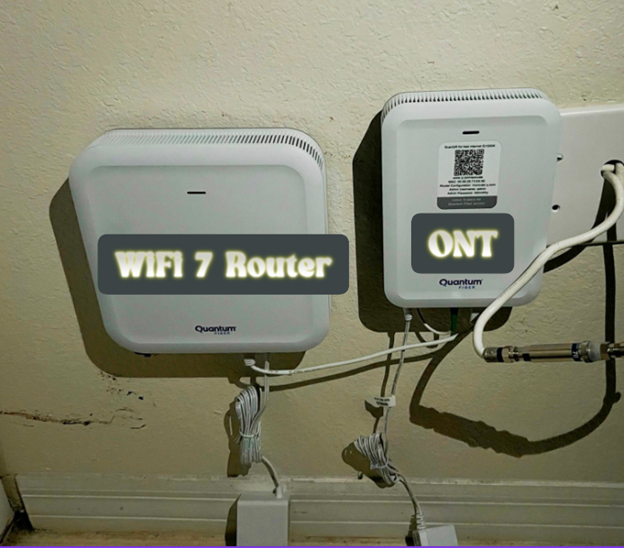
THE EQUIPMENT IN THE PICTURE ABOVE NEEDS TO REMAIN PLUGGED IN AT ALL TIMES. SIGNAL IS BY ‘LIGHT’ THROUGH FIBER OPTIC CABLE FROM EQUIPMENT ON IMMOKALEE RD THAT HAS 8 HOUR BACKUP.
EQUIPMENT TO CONVERT THAT LIGHT TO SIGNAL IN YOUR UNIT IS PLUGGED IN AS IT REQUIRES POWER.
YOU MAY WISH TO PUT THESE 2 PIECES OF EQUIPMENT ON A BATTERY BACKUP IN THE EVENT OF A POWER OUTAGE YOU SHOULD CONTINUE TO HAVE INTERNET SERVICE FOR MOBILE DEVICES AS LONG AS BATTERY BACKUP LASTS.
Pages
- Home
- Community amenities
- Contact information & Location
- Payment portal login
- Community Documents
- Instructions for E-Voting
- Forms
- Condominium Documents
- Parking notices
- Calendar of Events
- Properties for rent
- Community Access
- Xfinity community internet
- Sheriff announcement
- Package Deliveries
- Quantum Fiber Internet
- Board Meeting 6-08-26
- Privacy Policy